
Tecimob Integration
Learn how to set up OneClick Tracking in Tecimob.
OneClick Tracking is a feature for Meta Ads advertisers who capture leads through their Tecimob website and CRM. It links each captured lead to the campaign that generated it, delivering immediate and accurate conversion tracking.
This solution corrects wrong attributions made by Meta, delivering real data based on UTMs and enabling safer scaling decisions.
With OneClick Tracking you see the real volume of leads per period right in your Ads Manager, making audits quick and clear, with no need for complicated dashboards that have to be kept up to date.
Using the webhook from your Tecimob account, OneClick takes into account both UTM data and Meta’s data, without duplicating leads.
Note: OneClick Tracking removes the need for extra tracking tools!
How to Plug OneClick Tracking into Tecimob
Section titled “How to Plug OneClick Tracking into Tecimob”-
Log in to your OneClick Ads account.
-
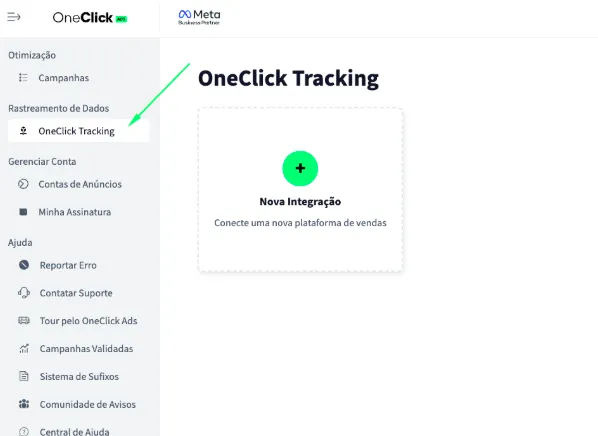
Go to the "OneClick Tracking" tab, available in the left sidebar of OneClick Ads.
-
Click "New Integration".
-
Select the "Lead Generation" product type and click Continue.
-
Select the "Tecimob" platform and click Continue.
-
Copy the Webhook URL generated by OneClick and register it in Tecimob following the steps below: a. Each ad account gets a unique, automatically generated link. b. This link is what connects your account to Tecimob and tracks leads by UTM.
6.1. Open your Tecimob account dashboard and click the gear icon to open “Ajustes gerais” (General settings).
6.2. In the sidebar, open the Webhooks area.
6.3. Click “Adicionar Webhook” (Add Webhook).
6.4. In the “URL do Webhook” (Webhook URL) field, paste the tracking URL provided by OneClick.
6.5. Leave the “Nome do Parâmetro do Header” (Header parameter name) and “Valor do Parâmetro do Header” (Header parameter value) fields blank — see the note below.
6.6. Click “Cadastrar” (Register) to confirm.
6.7. Back in OneClick, enter the funnel stages that should count as a conversion — one per field, written as they appear in your Tecimob funnel.
-
Copy the UTM Script generated in OneClick Tracking.
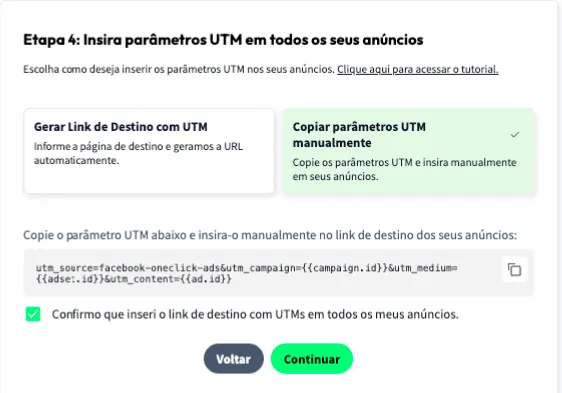
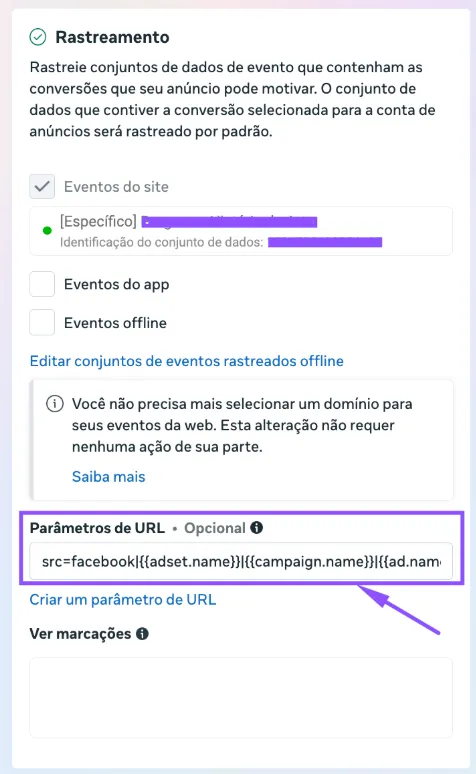
7.1. Paste it into the "URL parameters" field in ALL of your ads in Ads Manager, as shown below:
- Add the UTM Passthrough Script to every page of your Tecimob website, so the UTMs are carried through to the form where the lead is captured: a. You can install it via Google Tag Manager or, preferably, directly in your website’s header. b. The script must be present on the property page and on any landing page that comes before the contact form.
-
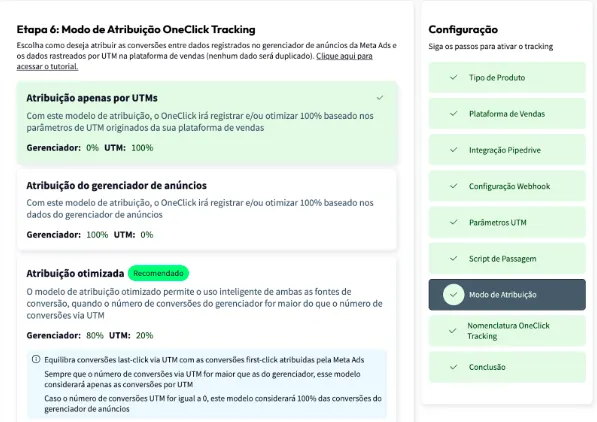
Set the Attribution Mode.
- Watch this video to understand each model.
- Click Continue.
-
Set the Naming Convention that your campaigns, ad sets and ads will receive in your Ads Manager and click next.
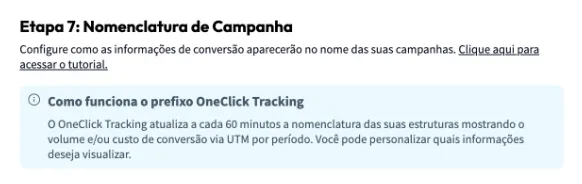
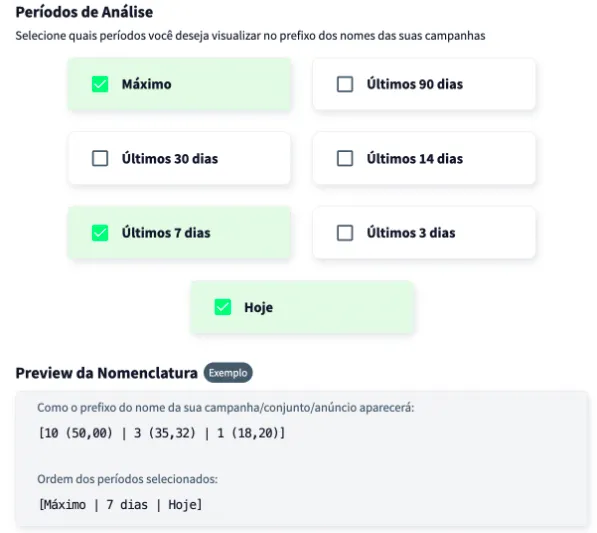
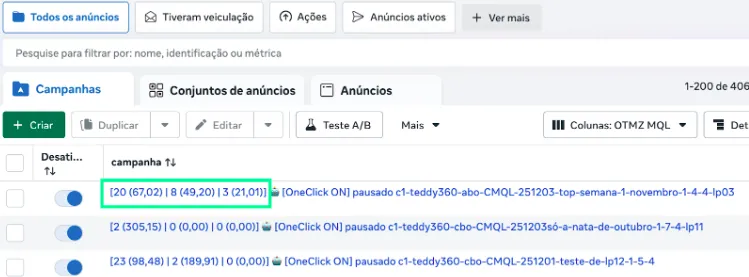
Wait at least 24 hours for the setup to take effect, and all your campaigns (those that receive conversions) will start recording conversions right inside Ads Manager.
Important Notes
Section titled “Important Notes”- Install and keep the Meta pixel on the pages of your Tecimob website.
- A lead is recorded as a conversion with no value: unlike a sale, a lead has no price or payment status, so OneClick Tracking counts the volume of leads, not revenue.
- Stages are entered by hand. Tecimob offers no way for OneClick to read the list of funnels and stages in your account, so they are typed into the setup. If you rename a stage in Tecimob, update it here too.
- Each lead is counted only once. If the same lead moves to another stage in the Tecimob funnel and that triggers new deliveries, they are recognized as the same lead and don’t add duplicate conversions.
- The UTM pass-through script must be present on every page that comes before the contact form — it is what carries the campaign parameters through to the moment the lead is submitted.
- Only campaigns created after the setup will have access to the “Maximum Period” data. This does not affect OneClick Ads’ optimization of older campaigns in any way.
- Keep at least one ad identifier (
ad.id) in the UTM parameters — it is what allows OneClick Tracking to link the lead to the correct campaign, ad set and ad. A lead that didn’t come from a tracked link arrives without these parameters and cannot be attributed to any campaign.