
Sympla Integration
Learn how to set up OneClick Tracking for your Sympla ticket sales.
OneClick Tracking is a feature for Meta Ads advertisers who sell tickets on Sympla. It tracks conversions accurately, sale by sale.
It corrects wrong attributions made by Meta, delivering real data based on UTMs and allowing safer scaling decisions.
With OneClick Tracking you see the volume of real conversions per period in your ads manager, making a quick and clear audit possible without dashboards that are hard to keep up to date.
Sympla does not send webhooks on its own. The connection therefore goes through Pluga: for every approved order on Sympla, Pluga sends the order data, UTMs included, to OneClick Tracking.
How to Connect OneClick Tracking to Sympla
Section titled “How to Connect OneClick Tracking to Sympla”-
Log in to your OneClick Ads account.
-
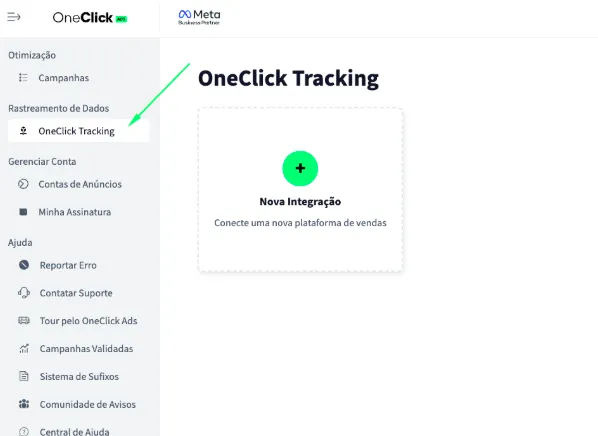
Go to the "OneClick Tracking" tab, available in the left sidebar of OneClick Ads.
-
Click "New Integration".
-
Select the "E-commerce" product type and click Continue.
-
Select the "Sympla" platform and click Continue.
-
Copy the Webhook URL generated by OneClick. You will use it in Pluga in step 7. a. Each ad account gets its own unique link, generated automatically. b. This link connects your account to your Sympla sales and tracks conversions by UTM.
-
In Pluga, create the automation that sends Sympla’s approved orders to OneClick:
7.1. Go to Pluga and create a new automation.
7.2. Choose Sympla as the source tool and the Pedido aprovado (approved order) trigger. Connect your Sympla account following Pluga’s own instructions.
7.3. Choose Pluga Webhooks as the destination tool and the Enviar uma mensagem via Pluga Webhooks (send a message) action.
7.4. In the URL da API da ferramenta field, paste the Webhook URL copied in step 6. If Pluga asks for a method, use POST.
7.5. In the message fields, create one field per row of the table below, named exactly as in the “Field” column, and fill each one with the Sympla data shown:
Field Sympla data in Pluga Required order_idIdentificador do pedido Yes order_totalValor total do pedido Yes approved_dateData de aprovação do pedido Recommended order_dateData do pedido Optional order_statusStatus do pedido Optional event_idIdentificador do evento Optional event_nameNome do evento Optional buyer_nameNome do comprador Optional buyer_emailE-mail do comprador Optional utm_sourceUTM source Yes utm_mediumUTM medium Yes utm_campaignUTM campaign Yes utm_contentUTM content Yes utm_termUTM term Yes The data names may look slightly different in Pluga. What matters is that the field name is exactly the one in the “Field” column.
7.6. Save and turn on the automation.
-
Copy the UTM Script generated in OneClick Tracking.
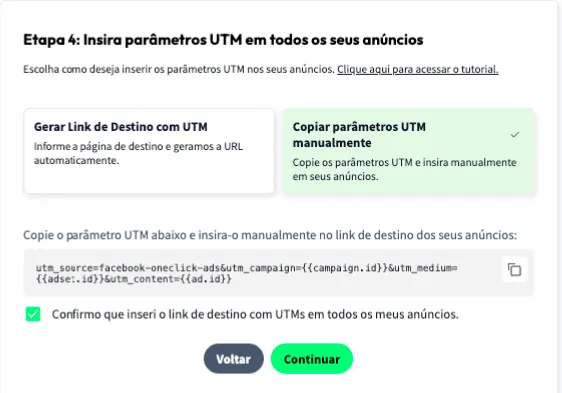
8.1. Paste it into the "URL parameters" field in ALL of your ads in Ads Manager, as shown below:
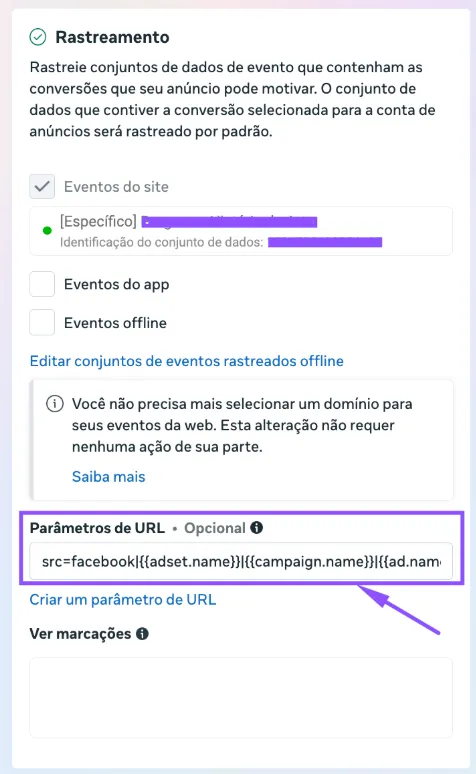
- Add the UTM Passthrough Script to all your sales pages, so the UTMs are carried through to the final checkout page: a. You can install it on your website via Google Tag Manager or, preferably, directly in your website's header. b. The script must also be present on the landing page that leads to your Sympla event page, so the event link receives the ad's UTMs.
- Set the Attribution Mode.
- Watch this video to understand each model.
- Click Continue.
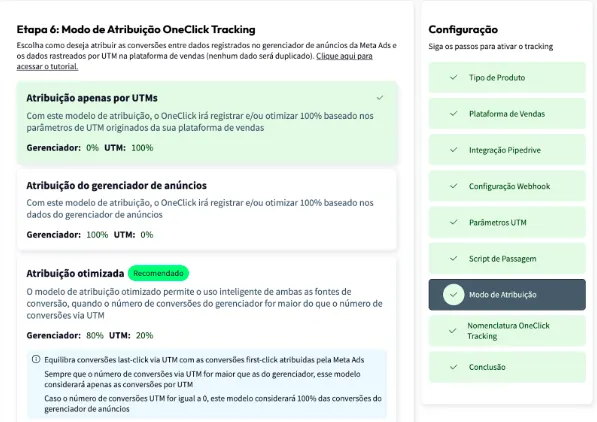
- Set the Naming Convention that your campaigns, ad sets and ads will receive in your Ads Manager and click next.
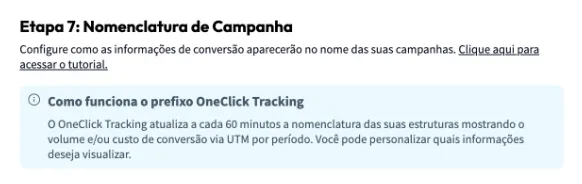
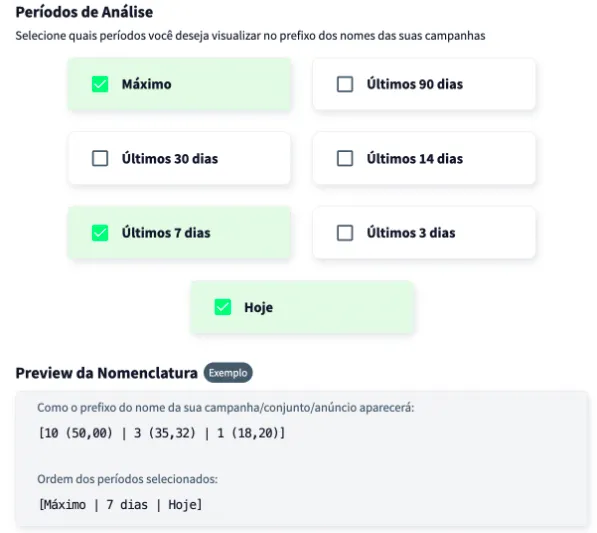
Wait at least 24 hours for the setup to take effect, and all your campaigns (those that receive conversions) will start recording conversions right inside Ads Manager.
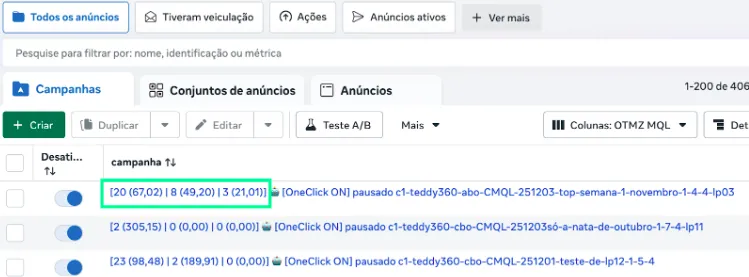
Important Notes
Section titled “Important Notes”- Pluga looks for new Sympla orders every few minutes (5 to 15, depending on the plan), so a sale shows up in OneClick with that delay.
- If your Pluga plan reaches its monthly event limit, Pluga pauses the automation and sales stop reaching OneClick until the next cycle or an upgrade. Keep an eye on usage in Pluga’s dashboard.
- OneClick Tracking records the sale at the order total, in Brazilian reais. Free tickets are recorded as zero-value conversions.
- Each order is recorded only once, by its Sympla order id, even if Pluga resends the message.
- Keep at least one ad identifier (
ad.id) in the UTM parameters — it is what lets OneClick Tracking tie the conversion to the right campaign, ad set and ad. If the buyer did not come from a tracked link, the sale cannot be attributed. - Only campaigns created after the setup will have access to the “Maximum Period” data. This does not affect OneClick Ads optimization of older campaigns in any way.